OMCI standard includes one object, that in my opinion is quite useful...
...however not all OLT vendors implement it. The object (manage entity) name is ONU Remote Debug (ME158). Its purpose is receiving command from OLT to be executed in ONT environment (can be regular unix shell) and to send back response to that command.
From specification (i.e. G.988) we can see, ME158 consists of:
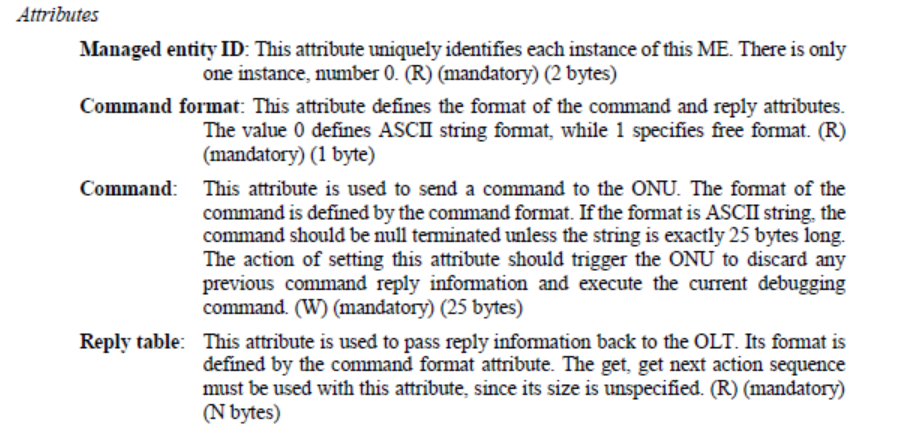
Max length of command sent to ONT can consists of 25 ASCII characters (ASCII is mostly used), but exact length and format can be limited by OLT implementation (CLI limitation i.e.).
From ONT perspective (Realtek's SDK) it looks like that:
Now, let's try on Nokia (ISAM7360) OLT and XGSPON ONT:
and OMCI log:
05 38 29 0a 00 9e 00 00 00 80 00 00 00 00 00 00 00 00 00 00 00 00 00 00 00 00 00 00 00 00 00 00 00 00 00 00 00 00 00 00 00 00 00 28 f7 34 b3 85
05 39 48 0a 00 9e 00 00 40 00 75 70 74 69 6d 65 00 00 00 00 00 00 00 00 00 00 00 00 00 00 00 00 00 00 00 00 00 00 00 00 00 00 00 28 7e c4 67 3c
05 39 28 0a 00 9e 00 00 00 00 00 00 00 00 00 00 00 00 00 00 00 00 00 00 00 00 00 00 00 00 00 00 00 00 00 00 00 00 00 00 00 00 00 28 04 4d 3e e5
In this case, we can observe command "uptime" sent from OLT to ONT via remote-debug managed entity.
The first operation is a simple GET. Just to check what command format is accepted (and it is 0x0 so ascii):
Second operation is SET - and it sets "command" atribute with "uptime" value:
*0x0539 OnuRemoteDebug SetRsp(0x0000,Result=0x0)
*0x757074696d65 = "uptime"
Third operation is to get table value of "response" parameter. This is not shown in parsed mode, so we can see some data in hex:
20 6c 6f 61 64 20 61 76 65 72 61 67 65 3a 20 36 2e 30 38 2c 00 20 35 2e 35 38 2c 20 35
2e 32 33 0a 00 72 61 67 65 3a 20 36 2e 30 38 2c
Now, let's try with Dasan OLT and GPON ONT (LXT-010G-D):
In this case, it looks like OLT considers only ASCII available, not even checking CmdFmt value. If you want, you can find response string in hex content of a message.
What about Huawei?
My answer is - ask Huawei... it seems that they don't need that, and as long as customers are not asking - there is no need to add such feature to CLI. In general - it is possible to send such command over OMCI using RAW OMCI message sent mechanism over CLI.
What about ZTE?
Also not supported... at least I have no information how to use it.
I will appreciate information about other OLT SUPPORTING RemoteDebug commands. Let me know - marcin.kuczera@leolabs.pl
Practical use case
We do have a device based on RTL9607C SoC (4x 1G LAN, 2x POTS) - Leox LXT-240G-C2. It is mostly used as L2 device, but it works in fact in hybrid mode.
It is possible to make it a router, so all the iphost functionality and WAN creation are useful as well as TR069.
So the case is that some customers configure iphost (0) to get ip address from DHCP. They could ping the ONT, but - no webGui access was possible (from WAN side).
So, we have created a binary file that operates on iptables level, and unlocks port 80 on specific interface. In this case - that specific interface is iphost interface managed by OMIC.
The command is:
That command can be also initiated from OLT side:
Dasan
DASAN-OLT-V5824G(config-gpon-olt[2])# onu remote-debug 11 iph0mgmt
Nokia
typ:isadmin># remote-debug ont 1/1/4/2/105 iph0mgmt
This binary opens webGui access for 60 seconds, once connected - the connection is kept as long as it is not closed by user(tcp protocol). So, new connections well be blocked again after 60 seconds, so you have enough time to start yours.
Same mechanism can be used to open telnet or ssh port on ONT device for further/deeper debugging/troubleshooting if necessary.
Join the Conversation
Follow us on LinkedIn to stay up to date with our latest engineering posts and updates!
Follow LeoLabs arrow_forward